Basic Linux Commands
Basic Linux commands to manage servers and get around the terminal like a GOD: folders, processes, searching inside files, listing files and disk usage.
 Snell Rojas
I wrote this post in Spanish in 2022 and adapted it to English in 2026.
These commands work on any Linux distribution you have installed, to manage servers and get around the terminal like a GOD.
It's true that programs like Visual Studio Code make several of the things I'll show you here easier, but these commands will make your life simpler whenever you need to get around a Linux server.
Whether you're a Linux geek or not, these commands will come in super handy, so let's get to the tutorial:
Basic Linux Commands to Get Around the Terminal, on Servers and Locally #
Find the path of the folder you're in:
$ pwd
Change directory:
$ cd path/to\ folder/

# Example: you're in your home folder and want to go to the git folder inside Documents

$ cd Documents/git
Go back one directory:
$ cd ..
Go back several directories:
$ cd ../..

# Example: you want to go back to the Documents folder from Documents/git/django/myproject

$ cd ../../..

# To check where you are:

$ pwd

/home/user/Documents
Go back and then forward:
$ cd ../.. && cd path

# Example: you're in Documents/git/django/myproject and want to go to Documents/git/virtual_envs

$ cd ../.. && cd virtual_envs
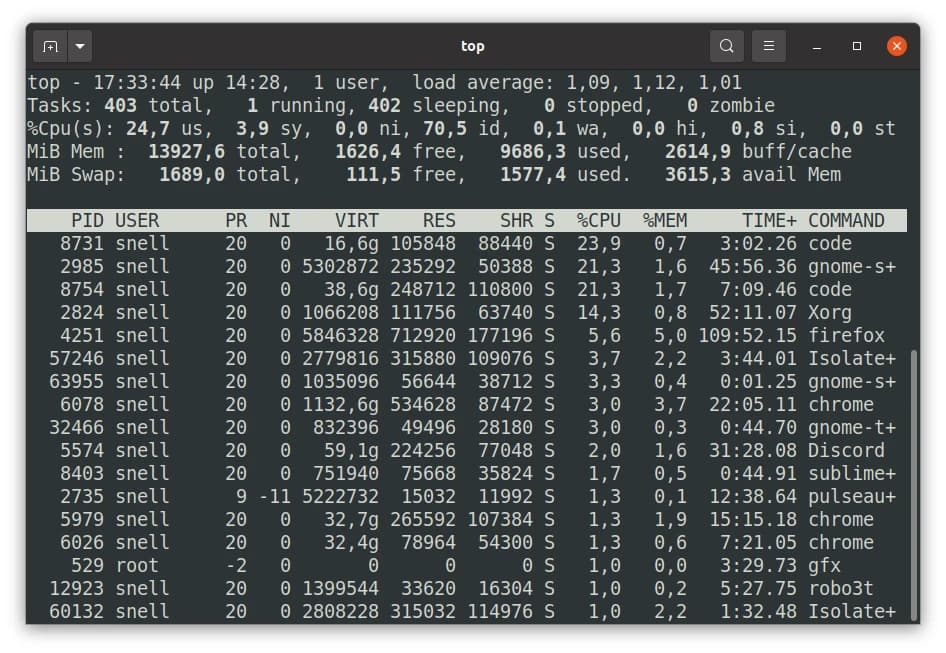
See the processes that are running:
$ top
Example output of the top command:
Kill a process from the terminal:
$ top

# Now find the PID of the COMMAND you want to kill.

$ sudo kill -9 PID

# Example: you want to kill Discord from the top output in the image above

$ sudo kill -9 5574
Search for text inside the files of a given folder:
$ grep -rnw "/path/to_folder/" -e "query"

# Where:
# r : path
# n : line number
# w : text of the line where it found the query
Search for text inside the files of the current folder:
$ grep -rnw $(pwd) -e "query"
Show the contents of a folder:
$ ls
Show the contents of a folder as a list:
$ ls -l
Show the contents of a folder as a list, including hidden files and permissions:
$ ls -lah
Show ONLY the files inside a folder:
$ ls -p | grep -v /
See how much disk space each folder and file takes up:
du -h | sort -h
See how much disk space each folder and file takes up (current folder only):
du -h --max-depth=1 | sort -h
Move only the files from one folder to another:
find . -maxdepth 1 -type f -exec mv {} destination_path \;
Search for a command you ran before:
history | grep "command to search for"

# Example:

history | grep "docker exec"
Show the number of files in each directory inside the current directory:
du -a | cut -d/ -f2 | sort | uniq -c | sort -nr