WordPress Taxonomies and On-Page SEO
How to use WordPress taxonomies (categories and tags) to improve your SEO: hierarchy by keywords, sections by topic, and clean URLs for niche sites.
 Snell Rojas
I wrote this post in Spanish in 2021 and adapted it to English in 2026.
Life throws so many punches at you from the day you're born that at some point you have to decide whether you get used to living all beat up, or you learn to dodge and block.
And what the heck does that have to do with WordPress and using taxonomies for SEO?
From where I stand, EVERYTHING. The reason is that WordPress is a friendly CMS, but it's one of those friends whose true value you only see after hating them for at least a couple of years.
As I always say, to me WordPress is to websites what Windows is to PCs.
It's not "the best", it's the most popular, but once you learn to use it properly you start to appreciate the perks that make it so popular.
WordPress is designed so everything runs on "autopilot", and for that it has several very good tools that make it easy to manage a blog.
The ones everybody uses most are theme templates and plugins.
The ones whose value only people trying to do some SEO on their websites can appreciate are taxonomies.
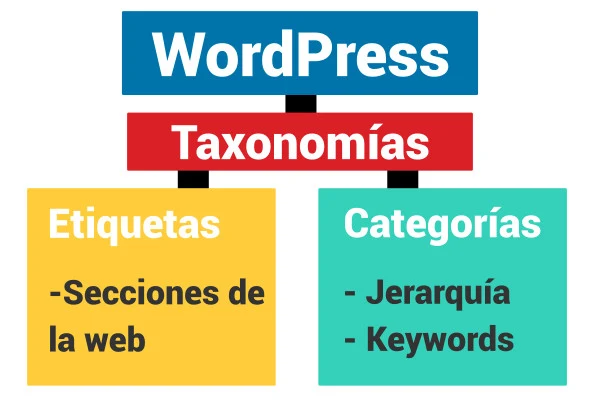
What the Heck Is a Taxonomy? #
Don't take my word for it, take Wikipedia's, which says something like:
The classification or ordering of things that share common characteristics into groups.
Let's use one of my favorite tools to put all this in context: the beloved (at least beloved by me) explanatory example.
Imagine you went shopping and came home with:
- Ham
- Cheese
- Bath soap
- Toilet paper
- Apples
Assuming you're a weirdo who tends to organize everything the moment you get home from the store, let me ask you this:
How could you classify these products?
Easy.
- We've got what you eat: ham, cheese, apples.
- And what you don't eat: bath soap and toilet paper.
If we want to give each group a "name", we could say:
- Bathroom products.
- Food products.
Taxonomies!
We've grouped our freshly bought products using the taxonomies "bathroom" and "food". In other words, a "taxonomy" is a name that groups things that are alike.
WordPress Has Two Very Useful Taxonomies for Organizing Content #
- Tags.
- Categories.
Let's talk about tags
This taxonomy tells the lord of the night (I mean Google) that the items that have it are related by a specific topic.
Now let's talk about categories
Categories are a bit more "complex" than tags.
The reason is simple: they're used to give content a hierarchy within a website.
And what does it mean to "give it a hierarchy"? What do we call hierarchy within a website?
This is simple too. It means that the closer a URL is to the root domain, the more RELEVANT the content is within the website (higher in the hierarchy), and the farther away it is, the less important it is (lower in the hierarchy).
This taxonomy is used more than tags.
Most SEO gurus have made it super popular for "organizing a niche site properly".
I'll give an example of how to use categories, to be as explicit as possible, before talking about how to combine them with tags.
Say I want to build a niche site about vacuum cleaners.
My root domain will be: mycrazyvacuum.com
What should go on the homepage?
Well, an article about vacuum cleaners.
It's a niche site, so the homepage itself is already a transactional article (or at least it should be).
Inside my website I'll have categories:
- Stick vacuums
- Handheld vacuums
- Etc.
So the URLs end up something like:
mycrazyvacuum.com/stick-vacuums (here there'd be a post about stick vacuums)
mycrazyvacuum.com/handheld-vacuums (here I'd only talk about handheld vacuums)
Let's move on to the website's subcategories, for example:
mycrazyvacuum.com/stick-vacuums/cordless (I'd only talk about cordless stick vacuums)
In the eyes of Big Brother (again, Google), this means that "cordless stick vacuums" is less important (within my website) than "stick vacuums", and that one in turn is less important than "vacuums" (my homepage, where I talk about vacuums).
The content follows a logical structure.
It's organized so Google knows which articles are more relevant than others.
How do you show a page instead of the category archive?
This may be a rookie question, but I'm here to explain even the obvious.
The hierarchical taxonomy "categories" has a default URL like:
rootdomain/category/category-slug
That HIDEOUS "category" wrecks the URL so epically it makes you want to cry just looking at it.
How do you get rid of it?
The magic of WordPress is how simple it is to use. Instead of messing with .htaccess (and breaking the whole website if you don't know what the heck you're touching), you can use a plugin.
The most popular one (most popular because I say so) is Yoast SEO.
The path is Yoast SEO > Search Appearance > Taxonomies > scroll all the way down and set the category URL prefix to "Remove".
That's enough for most people. It simply redirects the ugly URLs with "category" in them to a version without it, leaving:
rootdomain/category-slug
Clean and beautiful.
But that's not what we need.
Organizing a niche site properly is more elegant and doesn't need so many plugins.
To show a page with whatever content we want at the category URL, follow this path:
Settings > Permalinks, and do the following:
In the custom permalink structure box:
Enter /%category%/%postname%/
In the "Category base" field:
Enter /.
Save, and poof! We just broke the category URL :)
Now, when you try to visit rootdomain/category-slug, it'll say: Error 404, you screwed up, buddy.
But that's exactly what we wanted.
Now that the category exists, and our settings require it in the post URL, every article that's a child of the category will end up as:
rootdomain/category-slug/post-name
But what about the category URL?
After all, that's the one we care about, and to fill the gap we need to create a page with the same slug as the category.
Example:
Category: stick vacuums
Category slug: stick-vacuums
Then I create a page titled: stick vacuums
Page slug: stick-vacuums
Since the page now exists, we've un-broken the category URL. Now it'll show the content we need to show there (the review of stick vacuums instead of a list of the category's child posts).
Super useful, right?
This is "a royal pain", because now every time you create a category you have to create the matching page that will show at that URL, and every time you publish a child post you have to add it, by hand, to the content of the page that takes the category archive's place. But what can I tell you: if SEO were easy, nobody could put food on the table doing it.
And now for the cherry on top of this post, which I've humbly written for the lovely people who wanted to read it.
Using Categories and Tags Together to Improve SEO #
Let's combine taxonomies to properly organize a very large niche (or, as my buddy Deancito would say, "a mega niche").
We already know categories are hierarchy taxonomies that tell the daddiest daddy of them all (again, Google) how relevant a piece of content is within our website.
Tags, on the other hand, only tell it which pieces of content are related to each other.
So, for example, if we have an Amazon mega niche where we're going after "categories" (watch those quotation marks):
- Home
- Kitchen
- Etc.
What would the URLs look like?
rootdomain/kitchen/coffee-makers/drip
Does that look like the right kind of URL for a post about drip coffee makers on our website?
Like everything in SEO: IT DEPENDS.
It depends on how clean you want the niche site to be in terms of URLs.
Basically, you're telling Google that a post about coffee makers and one about blenders are "similar in terms of keywords", because they're both inside the "kitchen" category.
But think about it for a second. Is that really true?
I'll tell you: no.
Why? Come on, it's obvious, my friend: some keywords are about coffee makers and others are about blenders, lol.
Simple as that.
With this kind of URL, the more subcategories you add inside the "kitchen" category, the more you'll wreck the website's hierarchy, because you'll be mixing very different keywords.
So how can you fix this problem?
By removing "kitchen" from the URL.
So the website would be: rootdomain/coffee-makers/drip
For drip coffee makers, and you tell Google that rootdomain/coffee-makers/ is a more relevant article, to avoid little cannibalization problems.
Plus, you get the advantage of not mixing keywords like blenders, mixers, microwaves, etc. inside the same hierarchy.
Now let me ask you: which URL are you going to use to link to all the articles that have to do with "kitchen"?
Are you going to create a page with the slug "kitchen" and link from there?
That sounds logical, but then you'd have the "problem" of having to link each post, by hand, to that page so Google understands they all belong to the same set of articles.
This is where tags come in, to add that link to the section automatically.
Follow the path:
Settings > Permalinks > Tag base
And enter /.
You'll "kill" the rootdomain/tag/tag-slug URLs,
leaving rootdomain/tag-slug URLs with a 404 error.
You fix this the same way we fixed the category 404 (by creating a page with the same slug).
Now you can tag all the content (pages and posts) that has to do with kitchen products with the "kitchen" tag, whose URL is rootdomain/kitchen, where you'll show a page that links to everything (coffee makers, blenders, food processors, etc.).
That simplifies things a bit. However, there's one internal link you have to add by hand, and that's the one from each category child to its parent. From "drip coffee makers" you need to link to "coffee makers", and the same goes for every category.
You, the sharp, attentive SEO mercenary, are probably already thinking, "Hold on, this complicates link building a bit, I'll have to find topical links for each category." And yes, you're right, but like I said before: that's how it is, SEO isn't easy.
The summary of all this rambling is that you can use the categories taxonomy to group and rank content by its keywords, and the tags taxonomy to group all the content that has to do with the same topic (in this example, kitchen).
Easier to digest
Categories group and rank content by KEYWORDS.
Tags group content by the same TOPIC (in our example, "kitchen").
Graphically, the internal linking would look something like this:
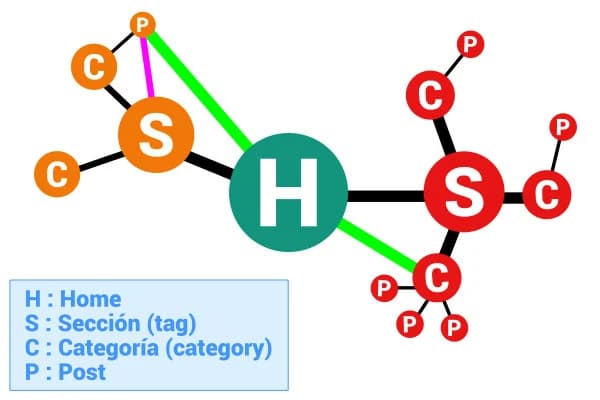
Where the green line is a one-way link from the homepage, and the pink line is a one-way link from the category.
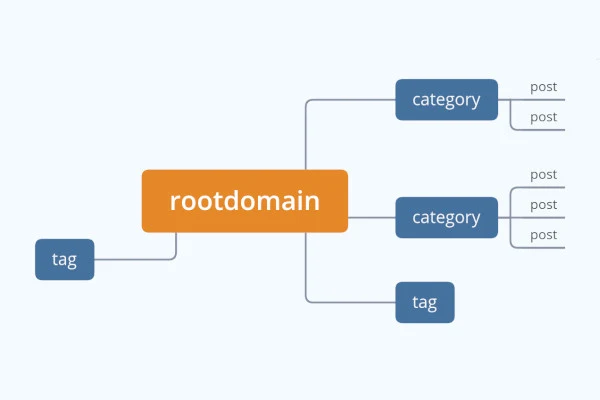
Meanwhile, the URL architecture would look like this:
And there you have it, kids: WordPress has things that make life easier, but if you want to do real SEO, you have to get up at 4 a.m. and do push-ups with your keywords if you want to dominate the SERPs.